What's new
Peugeot RCZ Forum

Register a free account today to become a member. It's free! Once signed in, you'll be able to participate on this site by adding your own topics and posts, connect with other members through your own private inbox and take part in competitions!

GUIDE: Updating the firmware, maps and installing risk areas (RADARs) on NG4

RCZ-Fan

New Member
Joined
May 28, 2023
Messages
23
Reaction score
17
Points
3
Location
Deutschland
Just tried reinstalling the firmware files and it has made no difference to the screen software version. It is still showing as invalid. However, "the plot thickens". (English phrase). Map locations are no longer showing full UK post codes. They are only showing the the first half of the postcode and the first number of the second half (example "S8 8XZ" is only selectable as "S8 8"). This is something which use to exist when I first got the car back in 2012. I will reload the Maps USB and hopefully this will fix this problem.

As to telephone numbers imported on to the unit from my iPhone, I do notice they are imported with blanks between country code, prefix and actual number (e.g. +44 0777 123456). Yet if you add a number manually to the address book of the NG4 you are not allowed to add spaces. ( i'm going to play with this and see if updating the address book manually to not have spaces will fix the problem.

Thank you for your assistance so far.


Naja, bei mir wird die Version auch als "not aviable" angezeigt.

Aber das hat keinen Einfluss auf die KArten oder andere Dinge
 

juzernejm

New Member
Joined
Dec 11, 2025
Messages
1
Reaction score
0
Points
1
Location
Bosnia
Hi everyone, I’m new to the forum and I hope someone can help me.


I have a Peugeot 3008 with the NG4 navigation system (firmware NG4_D_N42c_N42.03), and after installing the new maps I keep getting the message “Installation in process” constantly.
The update finished normally and the navigation opened, but the message keeps appearing all the time, even though the USB stick has been removed.


I also tried inserting the same USB again and reinstalling the update, but the result is the same — it still keeps showing “Installation in process.”


Has anyone experienced this issue or knows how to fix it?
Thanks in advance! 🙏
 

RCZ-Fan

New Member
Joined
May 28, 2023
Messages
23
Reaction score
17
Points
3
Location
Deutschland
Hi everyone, I’m new to the forum and I hope someone can help me.


I have a Peugeot 3008 with the NG4 navigation system (firmware NG4_D_N42c_N42.03), and after installing the new maps I keep getting the message “Installation in process” constantly.
The update finished normally and the navigation opened, but the message keeps appearing all the time, even though the USB stick has been removed.


I also tried inserting the same USB again and reinstalling the update, but the result is the same — it still keeps showing “Installation in process.”


Has anyone experienced this issue or knows how to fix it?
Thanks in advance! 🙏


1. System neustarten beziehungsweise auf "Auslieferungszustand" zurücksetzen
2. Installation neu durchlaufen lassen.


Ich hatte das Problem auch mal, ich habe dan mein system neu installiert, dann war dieses Problem gelöst.

Hoffe ich konnte helfen und es führt bei Dir zum Erfolg.

Lieben Gruß

Tristan
 

RCZ-Fan

New Member
Joined
May 28, 2023
Messages
23
Reaction score
17
Points
3
Location
Deutschland
Frohe Weihnachten.

Ich habe die aktuelle Version für das NG4, betreffend der EU Karte und der stationären Radar / Blitzer Warnung.
Stand Dezember 2025

Wer die haben möchte, bitte gerne melden.
 

AlexDee

Member
Joined
Jan 4, 2022
Messages
42
Reaction score
10
Points
8
Location
Italy
Frohe Weihnachten.

Ich habe die aktuelle Version für das NG4, betreffend der EU Karte und der stationären Radar / Blitzer Warnung.
Stand Dezember 2025

Wer die haben möchte, bitte gerne melden.
Please upload and share it, thanks ! Happy new year !
 

Míra

New Member
Joined
Jan 23, 2026
Messages
1
Reaction score
2
Points
3
Location
Czech Rep.
Perfektní!!! Děkuji uživateli NF7 za skvělý návod na instalaci Firmwaru, map i radarů (y) Uživateli RCZ-Fan za poslední aktualizaci map 2025 a radarů 2025 (y) Už mám nainstalováno a bez problémů.
Pokud by měl někdo problém s načtením USB Flash a spuštěním, použijte jiný USB Flash. V mém případě fungoval až druhý při stejném postupu. Celá instalace proběhla bez jediného chybového hlášení. Vše v navigaci funguje jak má.
Ještě jednou velké díky oběma.

Mirek - Česká republika
Peugeot 5008; rok výroby 2010
 

Attachments

  • Aktualizace.jpeg
    Aktualizace.jpeg
    41.2 KB · Views: 8

RCZ-Fan

New Member
Joined
May 28, 2023
Messages
23
Reaction score
17
Points
3
Location
Deutschland
Anyone able to upload the radar file ?
Tut mir Leid, ich bin mittlerweile da ein wenig geizig geworden.

Die letzten beiden MAP Aktualisierungen habe ich auf meine Kosten besorgt, dank der Hilfe von Nf7

Die fast monatlichen Updates zu den Radar und Blitzer Stationen für Europa bekommt ihr auch. Alles gratis.

Das dies auch Geld kostet vergesst ihr manchmal leider.

Daher habe ich mich da sehr zurückgezogen das alles kostenlos zur Verfügung zustellen.
Ich will damit kein Geld verdienen, doch ab und an mal ein paar Euro fände ich schon fair.

In diesem Sinne, vielleicht einfach mal selber um die Software bemühen und kaufen und uns kostenlos zur Verfügung stellen, dann weißt Du auch wie sich hier engagierte Forenmitglieder fühlen!

Allzeit gute Fahrt.

Tristan
 

RCZ-Fan

New Member
Joined
May 28, 2023
Messages
23
Reaction score
17
Points
3
Location
Deutschland
Perfektní!!! Děkuji uživateli NF7 za skvělý návod na instalaci Firmwaru, map i radarů (y) Uživateli RCZ-Fan za poslední aktualizaci map 2025 a radarů 2025 (y) Už mám nainstalováno a bez problémů.
Pokud by měl někdo problém s načtením USB Flash a spuštěním, použijte jiný USB Flash. V mém případě fungoval až druhý při stejném postupu. Celá instalace proběhla bez jediného chybového hlášení. Vše v navigaci funguje jak má.
Ještě jednou velké díky oběma.

Mirek - Česká republika
Peugeot 5008; rok výroby 2010


Für solch ein Feedback, macht es auch Spaß sich hier zu engagieren.

Lieben Gruß

Tristan
 

Archangel

New Member
Joined
Apr 19, 2020
Messages
6
Reaction score
4
Points
3
Location
Eindhoven, Netherlands
The previous guide is a little bit old so I decided to update it with the latest possible FW, latest maps, and updated risk areas.

LATEST FIRMWARE: N42c (final update - SatNav support discontinued after 2016).
LATEST MAPS: EUROPE 2025-1 (For Eastern Europe (maps 2020-2) use this
LINK)
LATEST RISK AREAS/RADARS: EU RADARS 2025.05 (MAY 2025 Update)

All files are available in their respective parts of the guide.

UPDATING THE FIRMWARE

1. Check your installed firmware version via SETUP -> Settings -> Version Information
2. If you see N42c anywhere in the presented firmware version you already have the latest firmware and you do not need to update it. You can move to the MAP updating part of the guide. If you do not have the latest version, proceed to step 3.
3. Download this file: LINK
4. Prepare USB 32GB or SD CARD formatted as FAT32, 64KB Cluster size.

IT IS IMPORTANT THAT YOU FORMAT VIA WINDOWS AND DO NOT USE QUICK FORMAT. The regular format will take more time, but it is absolutely necessary.

5. Extract the downloaded file and put all files into the ROOT of the USB/SD CARD. Enable in Windows to view "hidden files" and check if any file other than that of the firmware generated in the root of the USB / SD CARD. If you see any "rogue" files, delete them.
6. Turn on the car. Keep it running and insert the USB or SD CARD into their locations (SD CARD in front of the Console, USB under the armrest).
7. If you followed the guide the NG4 system will automatically detect and prompt you to start the update. Click yes on the console and wait for it to finish.

KEEP THE CAR RUNNING UNTIL IN FINISHES WITH THE UPDATE. You do not want the car to turn off and cancel the update. It could destroy your system.

8. When the NG4 resets check the firmware version again. If you see N42c the update was successful.

UPDATING THE MAPS

1. Download this file: LINK (2024-2 with original 2016 POI from PSA).

2. Prepare USB 32GB or SD CARD formatted as FAT32, 64KB Cluster size.

IT IS IMPORTANT THAT YOU FORMAT VIA WINDOWS AND DO NOT USE QUICK FORMAT. The regular format will take more time, but it is absolutely necessary.

3. Extract all files from the ZIP file to the ROOT of the USB / SD CARD. Enable in Windows to view "hidden files" and check if any file other than that of the map files included in the ZIP file generated in the root of the USB / SD CARD. If you see any "rogue" files, delete them.

This is how your USB / SD Stick should look like after copying the files (everything should be the same, except the last file which is from the 2020 maps):
View attachment 11365

4. Turn on the car. Keep it running and insert the USB or SD CARD into their locations (SD CARD in front of the Console, USB under the armrest).
5. If you did everything correctly, the NG4 will recognize the new maps automatically and prompt you to start the update. It takes around 40-50 minutes. It is advised to drive around with the car in the meantime.

KEEP THE CAR RUNNING UNTIL IT FINISHES WITH THE UPDATE. You do not want the car to turn off and cancel the update. It could destroy your system.

5.1. If during the update the error 0x26E appears, just press "OK" and wait for the system to restart (leave the key or SD card connected) and it will continue the update.

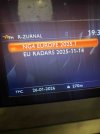
6. When it finishes, it will prompt you to press OK and remove the USB/SD CARD. Remove it and ONLY THEN press OK. After the NG4 System resets check the map version via SETUP -> When in the setup menu LONG PRESS SETUP -> GPS Information -> Map Versions. You should see "NG4 EUROPE 2023-Version-1.0".

UPDATING THE RISK AREAS

1. Download this file: LINK
2. Prepare USB 32GB or SD CARD formatted as FAT32, 64KB Cluster size.

IT IS IMPORTANT THAT YOU FORMAT VIA WINDOWS AND DO NOT USE QUICK FORMAT. The regular format will take more time, but it is absolutely necessary.

3. Extract all files from the ZIP file to the ROOT of the USB / SD CARD. Enable in Windows to view "hidden files" and check if any file other than that of the files included in the risk areas ZIP file generated in the root of the USB / SD CARD. If you see any "rogue" files, delete them.
4. Turn on the car and go to NAVIGATION -> SETTINGS -> IMPORT MY POINTS OF INTEREST
5. Select the Media you used (USB or SD CARD) and press YES to validate, that it will overwrite all previous risk areas.
6. After it finishes with the installation of risk areas (takes approx 10 seconds) a message appears to confirm a restart of the NG4 system and to remove the USB/SD CARD. Remove and press OK.
7. When the NG4 System restarts, all you have to do is to enable the risk areas/radars alerts in the Navigation menu. SETTINGS -> RISK AREA SETTINGS -> ENABLE all options.
8. You can check the latest risk areas/radars update in the same menu, that you used to check the MAP Version.

CAUTION. Proceed with every step at your own risk. It is extremely dangerous and it can destroy your NG4 system. No one on this forum or the forum itself is responsible for the caused damage and possible expenses.

I managed to install everything in one afternoon with no issues (my car is RCZ 2013 model). Take your time, follow the steps and it should be fine.

EDIT: Updated the link for the maps and updated the guide a bit - added a photo of how should USB / SD Card root directory look like after copying the files.
EDIT 2: Added the link for Eastern Europe maps - maps from 2020 (Courtesy of Ross_Russev)
EDIT #: Updated the links for MAPS and RISK AREAS - due to new updates.

Hi, Quick question. Why do i need a 32GB usb stick to update the firmware? Won't a 8Gb do?
 

Archangel

New Member
Joined
Apr 19, 2020
Messages
6
Reaction score
4
Points
3
Location
Eindhoven, Netherlands
As good a reason as any i guess. 🤪 OK. I'll give it a try with an 8gb. Thanks
Update
Instalation using an 8gb stick worked just fine. 😉 I'm now running the latest firmware on my NG4. I plan on doing the maps this week. I never realized how long it takes to format a 32GB usb stick. Holy shit dude! 😂 At any rate thank you for all your hard work in maintaining this tutorial NF7. Much appreciated.
Just one more thing. It's either or right. Install the west europe or east. Not both?
 

AlexDee

Member
Joined
Jan 4, 2022
Messages
42
Reaction score
10
Points
8
Location
Italy
Tut mir Leid, ich bin mittlerweile da ein wenig geizig geworden.

Die letzten beiden MAP Aktualisierungen habe ich auf meine Kosten besorgt, dank der Hilfe von Nf7

Die fast monatlichen Updates zu den Radar und Blitzer Stationen für Europa bekommt ihr auch. Alles gratis.

Das dies auch Geld kostet vergesst ihr manchmal leider.

Daher habe ich mich da sehr zurückgezogen das alles kostenlos zur Verfügung zustellen.
Ich will damit kein Geld verdienen, doch ab und an mal ein paar Euro fände ich schon fair.

In diesem Sinne, vielleicht einfach mal selber um die Software bemühen und kaufen und uns kostenlos zur Verfügung stellen, dann weißt Du auch wie sich hier engagierte Forenmitglieder fühlen!

Allzeit gute Fahrt.

Tristan
Hi. I’m willing to contribute financially for the speed camera file. Tell me how much you want. I’m undecided about the maps—I don’t really use them much anymore; I almost always use Waze. In any case, how much would the maps cost?”
 

NF7

Active Member
Joined
Apr 15, 2021
Messages
479
Reaction score
235
Points
43
Location
Slovenia
Update
Instalation using an 8gb stick worked just fine. 😉 I'm now running the latest firmware on my NG4. I plan on doing the maps this week. I never realized how long it takes to format a 32GB usb stick. Holy shit dude! 😂 At any rate thank you for all your hard work in maintaining this tutorial NF7. Much appreciated.
Just one more thing. It's either or right. Install the west europe or east. Not both?
Yes. Either or. West covers pretty much everything from Hungary to the Western Europe.

Also the map size is about 12.1GB yes.
 

RCZ-Fan

New Member
Joined
May 28, 2023
Messages
23
Reaction score
17
Points
3
Location
Deutschland
Hi. I’m willing to contribute financially for the speed camera file. Tell me how much you want. I’m undecided about the maps—I don’t really use them much anymore; I almost always use Waze. In any case, how much would the maps cost?”
Send me your Mail Adress per PM please, i will sent you al download Link.
 
Top