What's new
Peugeot RCZ Forum

Register a free account today to become a member. It's free! Once signed in, you'll be able to participate on this site by adding your own topics and posts, connect with other members through your own private inbox and take part in competitions!

Sat Nav update

DKZ5745

Well-Known Member
Joined
Sep 7, 2014
Messages
5,119
Reaction score
588
Points
113
Location
Yorkshire
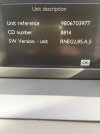
Followed the link, downloaded file, created CD & installed :dance:

No idea what improvements there are, only just done it, took around 30 minutes - engine running as usual :sleeping-yellow:
 

Attachments

  • image.jpg
    image.jpg
    249.8 KB · Views: 7,877

DKZ5745

Well-Known Member
Joined
Sep 7, 2014
Messages
5,119
Reaction score
588
Points
113
Location
Yorkshire
I did try to install from a USB stick. For some reason, it read the " media " for some time, then appeared to do nothing else. But when I put the same software on a cd it worked fine. Go figure? :eusa-think:

I suppose it's always better to have the latest update? But not had time to see if it's made any difference at all to how things work.

Just happy to have a sat Nav that I can use (I.e. 7 digit postcodes) but already had that anyway :D

It's worth keeping an eye on their website for map updates though, they are always handy. Still on the 2013/14-2 at the moment. Not sure when any updates are due. :?:
 

DKZ5745

Well-Known Member
Joined
Sep 7, 2014
Messages
5,119
Reaction score
588
Points
113
Location
Yorkshire
As for your question about the song titles Chris, they answer is err, well, kind of :eusa-think:

USB stick selected, song titles come up, unless you change the mode, and go back to the map view, then you don't see the song titles.
Radio - again, depends on view mode. Map showing, no song titles, change mode to see the radio station selected, and then depending on their RDS function, the song title shows, with other radio station info.

Only checked after I upgraded to 2.85, but I think it was probably the same on 2.80 :crazy:

Haven't yet tried BT streaming or aux input, but I suspect on Aux input there won't be any track info shown. Will give it a go tomorrow if I remember.
 

DKZ5745

Well-Known Member
Joined
Sep 7, 2014
Messages
5,119
Reaction score
588
Points
113
Location
Yorkshire
Pretty sure that's the one on the GPRS website. So maybe you could download from there. My maps are from there and coming up as 2013/2014 - 2 so I assume that's the latest available.
 
A

Anonymous

Guest
DKZ5745 said:
Pretty sure that's the one on the GPRS website. So maybe you could download from there. My maps are from there and coming up as 2013/2014 - 2 so I assume that's the latest available.

Where do get the map info from? I've gone through lots of screens through the set up button but can't actually see any map dates.
 

DKZ5745

Well-Known Member
Joined
Sep 7, 2014
Messages
5,119
Reaction score
588
Points
113
Location
Yorkshire
It's on the "map details" section. It gives each map, then a date at the end.
 
A

Anonymous

Guest
18ME said:
DKZ5745 said:
Pretty sure that's the one on the GPRS website. So maybe you could download from there. My maps are from there and coming up as 2013/2014 - 2 so I assume that's the latest available.

Where do get the map info from? I've gone through lots of screens through the set up button but can't actually see any map dates.

If you mean on the system, press setup + esc at the samen time and you get access to version info
 
A

Anonymous

Guest
Hi

I have a 508sw 2012 as a new company car. I am really pleased with it apart from the sat Nav. Can somone give me instructions on how or if I can get the sat nav to do full postcode search.

I am not the most technical, so simple instructions would be appreciated. I am even considering buying myself a brand new 508. Do the new ones have full postcode sat Nav?

I had this problem years ago with rover 75, and bought a disc off ebay which fixed it.

Thanks

Gary
 
A

Anonymous

Guest
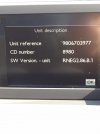
Just had the latest software update done FOC by the dealer and it's now RNEG2.86.B.1 and new map disc and USB stick edition 2014-1. No idea what the update includes other than I know have the 7 digit postcode which was the main thing I wanted. Now need to find out if I can get the 7 digit postcode on my Audi A5 now :eusa-think:
 

tianorth

Well-Known Member
Joined
Jun 2, 2013
Messages
1,835
Reaction score
52
Points
48
Location
Fareham, Hampshire
The only thing I really noticed on the 2.85 firmware update was that the parking sensor bleeps were a lot louder than previous.
Any idea what thus update does?
Did you manage to get it onto a usb stick?
 

DKZ5745

Well-Known Member
Joined
Sep 7, 2014
Messages
5,119
Reaction score
588
Points
113
Location
Yorkshire
Yes, this one worked ok from USB, I think the bleeps are back to normal, haven't really had chance to see if there are any other obvious changes :eusa-think:
 
A

Anonymous

Guest
Got the dealer to update mine when the R was in for her first service, foc of course :thumbup:
 
A

Anonymous

Guest
Does anyone happen to know the part number for version 2.86 please?
 
Top