tianorth
Well-Known Member
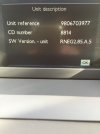
I have now updated my RT6 Firmware to V2.85 and this is how I did it.
See my other post about Sat Nav update for screen shots http://www.peugeotrczforum.co.uk/viewtopic.php?f=6&t=8219&start=20#p102898 - Please view full post as there is more details.
You need a couple of things in order to create this file on to a usb stick.
1) an archive program like winzip (which I have), winrar etc.
2) the .iso file.
3) a USB stick formatted as FAT32 (I used a 2Gb stick but files total 81Mb, I would also make sure there are no files/folders on the USB stick).
This was my process :-
1) Using link https://mega.co.nz/#!K9pwHbxS!LMGvGikH0qIokT7vmCd96GFcmsnRjr28IA14eh8nfAs I downloaded the file "RT6_Software_2.85.rar" to my PC.
2) Open the .rar file with your archive program.
3) Don't double click on the .ISO file as it will open a program to write it to a CD.
Instead right click on the file and choose extract and save the files to either your a) hard drive or b) straight to your USB stick (option 'b' is probably the quickest, as option 'a' will require you to copy the files/folders to the USB stick).
4) Once it has finished extracting you can remove the USB stick from the PC and put it in you RCZ USB slot.
5) It took about 3-5 minutes of "Checking the media" before it started the update of the firmware.
You have to keep the engine running!
It took about 10 minutes to completely install and update.
As it was updating it rebooted several times.
Of course there is nothing stopping you from downloading the file and double clicking the .iso file and writing it to CD.
Then use the CD to update your firmware.
Or you can then copy the files/folders from the CD to USB stick if you wanted.
There are a few options.
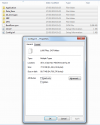
Here is a pic of the files/folders you should have on the root directory.
Hope this helps
Chris
See my other post about Sat Nav update for screen shots http://www.peugeotrczforum.co.uk/viewtopic.php?f=6&t=8219&start=20#p102898 - Please view full post as there is more details.
You need a couple of things in order to create this file on to a usb stick.
1) an archive program like winzip (which I have), winrar etc.
2) the .iso file.
3) a USB stick formatted as FAT32 (I used a 2Gb stick but files total 81Mb, I would also make sure there are no files/folders on the USB stick).
This was my process :-
1) Using link https://mega.co.nz/#!K9pwHbxS!LMGvGikH0qIokT7vmCd96GFcmsnRjr28IA14eh8nfAs I downloaded the file "RT6_Software_2.85.rar" to my PC.
2) Open the .rar file with your archive program.
3) Don't double click on the .ISO file as it will open a program to write it to a CD.
Instead right click on the file and choose extract and save the files to either your a) hard drive or b) straight to your USB stick (option 'b' is probably the quickest, as option 'a' will require you to copy the files/folders to the USB stick).
4) Once it has finished extracting you can remove the USB stick from the PC and put it in you RCZ USB slot.
5) It took about 3-5 minutes of "Checking the media" before it started the update of the firmware.
You have to keep the engine running!
It took about 10 minutes to completely install and update.
As it was updating it rebooted several times.
Of course there is nothing stopping you from downloading the file and double clicking the .iso file and writing it to CD.
Then use the CD to update your firmware.
Or you can then copy the files/folders from the CD to USB stick if you wanted.
There are a few options.
Here is a pic of the files/folders you should have on the root directory.
Hope this helps
Chris
Attachments
-
 Files.png47.4 KB · Views: 17,483