What's new
Peugeot RCZ Forum

Register a free account today to become a member. It's free! Once signed in, you'll be able to participate on this site by adding your own topics and posts, connect with other members through your own private inbox and take part in competitions!

Control MONOCHROME SCREEN C (RD5) and Left Button Lights on Android Head Unit (Peugeot RCZ 2015)

ZedAlm

New Member
Joined
May 31, 2025
Messages
4
Reaction score
0
Points
1
Location
Angola
Hi everyone,

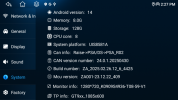
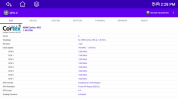
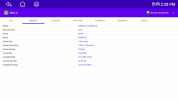
I recently bought a 2015 Peugeot RCZ that already came with an Android head unit installed, running on the UIS8581A platform (you can find full system details in the attached screenshots).


I’m looking for help with two things:
  1. How to get the MONOCHROME SCREEN C (Peugeot Connect Sound RD5) to work properly with the Android unit – I’d like to be able to interact with it as I believe this could be done on the OEM radio;
  2. How to control or change the color of the touch button lights on the left side of the radio – right now, they’re always on a loop of changing colors, and I’d like to know if it’s possible to change them to the same orange/red of the remaining lights.
Has anyone dealt with a similar setup or found a solution for these issues?

Thanks in advance for any help or advice you can share!
 

Attachments

  • Screenshot_20250531-142753.png
    Screenshot_20250531-142753.png
    172.5 KB · Views: 7
  • Screenshot_20250531-142832.png
    Screenshot_20250531-142832.png
    73.8 KB · Views: 7
  • Screenshot_20250531-142845.png
    Screenshot_20250531-142845.png
    63.1 KB · Views: 7

EddieJ

Active Member
Joined
Mar 29, 2025
Messages
108
Reaction score
31
Points
28
Location
Belfast
You might need to seek out the android head unit manufacturer in relation to correct canbus settings to suit the car and head unit.
I had to use a different setting and get a different canbus decoder to suit my head unit and regain functionalit.

As for the colour of the buttons, these should be configurable in the android device settings. Each android head unit can vary, so you either need to play around in the device settings or find a manual. These settings can be password protected, again device and manufacturer specific.
The device settings are in the Factory section.

PS stick a pic of the head unit up if you get a chance, mine is maybe 2 years old and android 13, just wondering if they fit the dash any better now.
 

ZedAlm

New Member
Joined
May 31, 2025
Messages
4
Reaction score
0
Points
1
Location
Angola
You might need to seek out the android head unit manufacturer in relation to correct canbus settings to suit the car and head unit.
I had to use a different setting and get a different canbus decoder to suit my head unit and regain functionalit.

As for the colour of the buttons, these should be configurable in the android device settings. Each android head unit can vary, so you either need to play around in the device settings or find a manual. These settings can be password protected, again device and manufacturer specific.
The device settings are in the Factory section.

PS stick a pic of the head unit up if you get a chance, mine is maybe 2 years old and android 13, just wondering if they fit the dash any better now.

Thanks, @EddieJ will contact the seller.

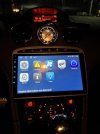
Here is the picture you asked for, took last night and it's poorly lit. Let me know if you want me to post a brighter one 🤪
 

Attachments

  • Image (37).jpeg
    Image (37).jpeg
    40.4 KB · Views: 9
Top