What's new
Peugeot RCZ Forum

Register a free account today to become a member. It's free! Once signed in, you'll be able to participate on this site by adding your own topics and posts, connect with other members through your own private inbox and take part in competitions!

A118 Dashcams

DKZ5745

Well-Known Member
Joined
Sep 7, 2014
Messages
5,116
Reaction score
586
Points
113
Location
Yorkshire
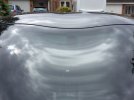
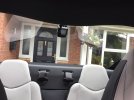
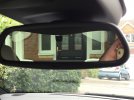
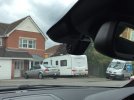
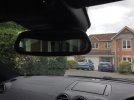
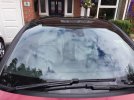
Howard, pictures as promised, not very good, car was dirty after returning from a round trip to Norfolk, but you can get the general idea....
 

Attachments

  • image.jpeg
    image.jpeg
    250.8 KB · Views: 5,739
  • image.jpeg
    image.jpeg
    249.4 KB · Views: 5,739
  • image.jpeg
    image.jpeg
    250.6 KB · Views: 5,739
  • image.jpeg
    image.jpeg
    254.9 KB · Views: 5,738
  • image.jpeg
    image.jpeg
    253.5 KB · Views: 5,738

DKZ5745

Well-Known Member
Joined
Sep 7, 2014
Messages
5,116
Reaction score
586
Points
113
Location
Yorkshire
A couple more...
 

Attachments

  • image.jpeg
    image.jpeg
    252.5 KB · Views: 5,732
  • image.jpeg
    image.jpeg
    250.1 KB · Views: 5,732

howardf

Member
Joined
Sep 26, 2011
Messages
193
Reaction score
0
Points
16
Location
South Yorkshire
Thanks for the pictures.
It looks a tidy job, no wires!!
Sorry for all of the questions........
Did you end up using 2x hard wire kits?
Where did you pick up your switched live supply.

Cheers...H
 

DKZ5745

Well-Known Member
Joined
Sep 7, 2014
Messages
5,116
Reaction score
586
Points
113
Location
Yorkshire
The front camera wire is tucked under the edge of the plastic mirror fitting, then along the screen top & down the A post, into the fuse box from underneath at the back (can't be seen when door is open), then a piggy back fuse connector for power & drilled a hole in the bare metal which can be seen at the side of the fuses and earthed with a self tapping screw. Used a hard wire kit for this one.

The rear power cable is connected the same way, wire runs up A post along edge of roof lining, down rear plastic cover next to parcel shelf & through holes behind rear headrest. Then fastened to underside of metal parcel shelf in boot using self adhesive cable clips (supplied with camera), into boot lining & round to near side inspection hole where it terminates connected to a 12v accessory socket.
Camera wire runs along roof lining, then follows power cable down plastic etc. Plugs into 12v socket behind inspection cover at near side of boot lining. No hard wire kit needed using this method.

Rear camera is an A118c which is the capacitor version, supposedly longer lasting than the battery version but slightly more expensive.

Front camera looks identical, but is the A118, battery version.

Both cameras have worked flawlessly since fitting.

 

tianorth

Well-Known Member
Joined
Jun 2, 2013
Messages
1,835
Reaction score
52
Points
48
Location
Fareham, Hampshire
You can have a look how I did mine although different cameras the powering/cabling routes could be done in a similar way
 

howardf

Member
Joined
Sep 26, 2011
Messages
193
Reaction score
0
Points
16
Location
South Yorkshire
Pete, thanks for the info and pictures..... Think I will go for a A118c (£38 from gear best) for the front as I like the way it fits to the front screen .

For the rear I am looking at the G1w-CB ....(£31 from gear best), decent write up and capacitor version, try and fasten it to the vent /Iso fix system behind the seat, rather than in the middle top of the screen, think that would annoy me!


Tianorth :- I did have a look at your install, like how you fitted the push button, looks oe. The K1s look good / different league....but don't really want to spend that much.

Howard
 

tianorth

Well-Known Member
Joined
Jun 2, 2013
Messages
1,835
Reaction score
52
Points
48
Location
Fareham, Hampshire
K1S is brilliant quality I have 2 sets!.
The emergency record button came with the cameras, just removed the cigarette lighter socket from the console tucked it underneath plugged in the extension sockets with usb.

Just stuck it over the hole with the wire running back under it.

As show in the thread.
 

DKZ5745

Well-Known Member
Joined
Sep 7, 2014
Messages
5,116
Reaction score
586
Points
113
Location
Yorkshire
I originally fitted the rear camera to the bottom of the screen, but I thought that the view would be better from the top of the screen, and as I rarely have anyone in the rear (I don't know any dwarfs) the camera isn't really in the way (I don't actually notice it there anymore, I have the screen set to go off afte 3 minutes).

Looking forward to seeing the pics after your installation. :thumbup:
 

howardf

Member
Joined
Sep 26, 2011
Messages
193
Reaction score
0
Points
16
Location
South Yorkshire
I finally got around to installing a A118c dahcam to the front of the RCZ. Couldn't find a switched 12v fuse supply to piggy back off.... The 12v socket supply fuse is permanently live in the fuse box .... (Ignition live at 12v socket) so ended up running a wire from the 12v socket wiring itself and then sub fused down to 2amp for the hardware kit.
Happy with the end job but wasted a bit of time trying to find an ignition live with the meter.
 

DKZ5745

Well-Known Member
Joined
Sep 7, 2014
Messages
5,116
Reaction score
586
Points
113
Location
Yorkshire
I had a similar problem with the fuses, but then just did the good old trial and error method of removing a fuse, sticking the piggy back holder in & turning the car on :shock:
It doesn't really matter what size fuse you take out, as you are using that same fuse in the piggy back holder, & then the correct size for your camera in other slot of the holder.

Glad you got it sorted though. It really does give you peace of mind when driving knowing it doesn't matter how much the pi110ck that hits you argues, you have the proof of what happened. (& if it's your fault you can always say the camera doesn't work :eusa-shhh: )
 
Top